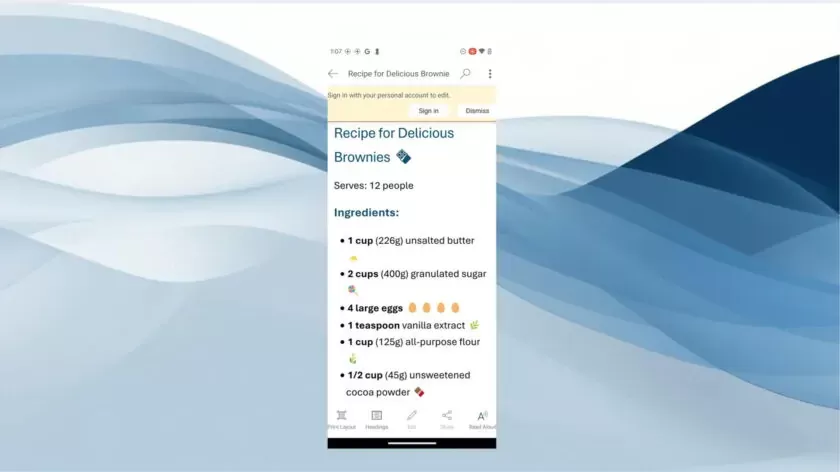
In a significant development for Android users, Microsoft has unveiled a new feature that allows for seamless, anonymous file sharing across its Office apps—Word, Excel, and PowerPoint—without the need for signing into a Microsoft account. Previously exclusive to iOS, this convenience now extends to Android, offering recipients read-only access to shared documents with a simple link click. This feature represents a notable quality-of-life enhancement for professionals and students who rely heavily on Office tools, while also signaling Microsoft’s efforts to narrow the gap with Google Drive’s longstanding sharing capabilities.
A New Level of Convenience for Android Users
Microsoft’s move to enable anonymous file sharing on Android comes as a welcome relief to many who have grown weary of the frequent log-in prompts when opening shared Office documents. This enhancement means recipients can now view files without the friction of account sign-ins—a small yet impactful change for users working on the go or juggling multiple devices.
The new capability works seamlessly with links generated within the Microsoft Office suite. To share a file, users simply open it in Word, Excel, or PowerPoint, tap the share icon, and either enter the recipient’s email address or manually copy the link. Android users who receive these links can then open the file immediately without authentication, mirroring the experience that has been available to iOS users since earlier this year.
How It Works: View-Only Access for Shared Documents
Although recipients will encounter a prompt encouraging them to sign in, they can dismiss it and still view the shared document in a read-only format. Editing and collaborative features remain gated behind the sign-in requirement, but for quick access to information—whether it’s a presentation, a spreadsheet, or a text document—this feature is a significant time-saver.
To take advantage of this functionality, senders must use version 16.0.18827.20066 or newer of the Microsoft Office apps. This ensures compatibility and guarantees that the shared links can be accessed without requiring the recipient to log in.
Microsoft Closes the Gap With Google
This update puts Microsoft’s file sharing capabilities more in line with Google Drive, which has long supported anonymous file access. While Google’s suite has set the standard for easy sharing without sign-ins, Microsoft’s Office tools remain deeply entrenched in business and academic environments. This change acknowledges the importance of reducing unnecessary hurdles, particularly for Android users who form a significant portion of the productivity app user base.
By extending this feature to Android, Microsoft not only improves its competitiveness but also underscores its commitment to refining user experience within its productivity suite. It may not be as eye-catching as major software overhauls, but incremental improvements like these are crucial for professionals who rely on seamless, reliable access to documents on mobile devices.
Implications for Business and Education
The ability to open shared Office files without signing in has important implications for workflows in both professional and academic contexts. For educators, it simplifies the process of sharing materials with students across devices. For businesses, it removes a small but persistent source of friction, facilitating quicker collaboration and decision-making.
Moreover, it signals Microsoft’s broader strategic goal: to ensure its flagship Office suite remains relevant and user-friendly in an increasingly mobile-first world. This change—though simple in implementation—reinforces the brand’s dedication to meeting users where they are, whether that’s at a desk or on a smartphone.
Looking Ahead
As Microsoft continues to evolve its Office suite, features like anonymous file sharing demonstrate a renewed focus on convenience and accessibility. For Android users, the arrival of this functionality marks a long-overdue enhancement that underscores the company’s responsiveness to user needs. It also hints at a broader trend in mobile productivity: a push toward frictionless, cloud-based workflows that prioritize user experience without sacrificing security.
In the dynamic ecosystem of productivity apps, every update matters—and this one ensures that Microsoft Office remains a top contender for professionals and students alike.
Comments