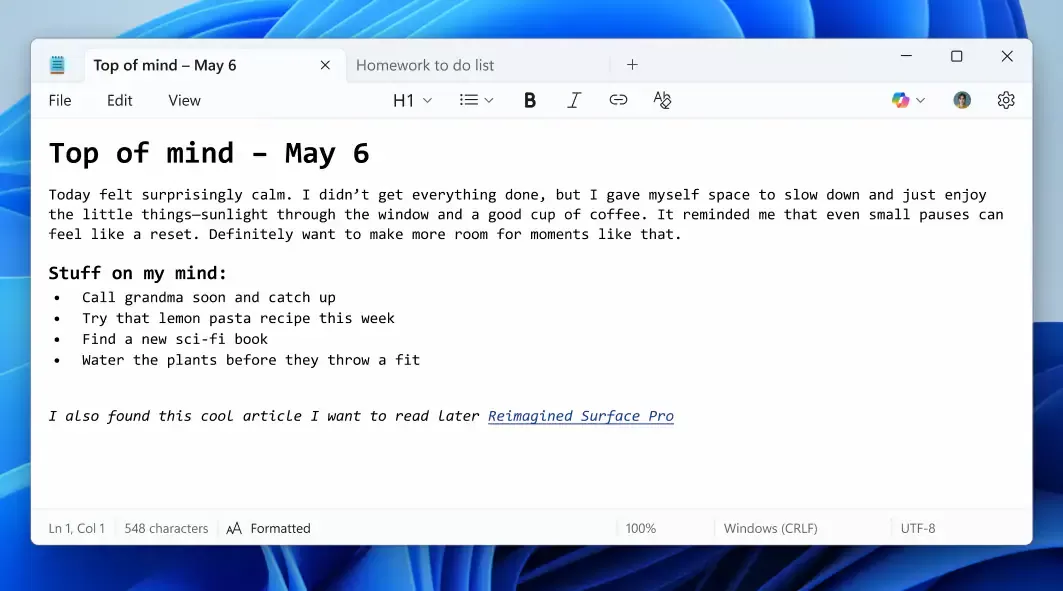
Microsoft is enhancing its classic Notepad app with new, sophisticated features that will help transform this decades-old utility into a more powerful text editing tool. The upcoming update introduces text formatting options such as bold, italics, and support for Markdown and hyperlinks, marking a significant departure from the app's long-standing simplicity. As part of its larger strategy to integrate generative AI into more apps, Microsoft is also adding AI-powered writing tools. While currently available in preview for Windows 11 Canary and Dev Channel testers, this overhaul could reshape how users interact with Notepad in the future.
A New Era for Microsoft Notepad: Transforming Simplicity into Functionality
For decades, Notepad has been a reliable companion for basic text editing on Windows. Its minimalistic design and straightforward functionality have earned it a loyal user base. However, as technology evolves and user expectations grow, Microsoft has decided to push the envelope with the latest update to this long-standing app. With new features like text styling options, Markdown support, and the integration of AI capabilities, Notepad is poised for a transformation that goes beyond simple note-taking.
This strategic shift is part of Microsoft's broader effort to enhance its productivity suite and make even the most basic apps more feature-rich and versatile. The integration of text formatting, combined with upcoming AI-powered tools, signifies that Notepad is no longer just for writing in plain text—it’s evolving into a more robust tool for the modern user.
Key Features: From Bold to Markdown
The most immediate change to Notepad comes in the form of text formatting options. Until now, Notepad has been a utilitarian tool, used primarily for creating quick notes or editing raw text files without any embellishments. However, the new update introduces several features that have been long-awaited by users.
- Bold and Italics: These basic styling options allow users to format text in a more structured way. This will be particularly useful for people who need to emphasize certain parts of their writing, like in notes or code documentation.
- Headings and Lists: The update also includes the ability to create headings and lists in different sizes, providing more flexibility for organizing content.
- Hyperlinks and Markdown Support: For those who use Markdown, this feature is particularly significant. Markdown is a lightweight markup language commonly used by writers, developers, and content creators to format text without relying on rich text editors. The integration of hyperlink support adds an essential element, making Notepad more versatile for writing web content or digital notes.
These enhancements are made accessible through a new format tab located at the top of the Notepad interface. This tab, which sits alongside File, Edit, and View, makes it easier to access the new features without cluttering the user interface.
Simplicity Still Reigns: Optional Formatting and Disabled Features
Despite these powerful new features, Microsoft is aware that many long-time users prefer Notepad's traditional, no-frills approach to text editing. As a result, the company is offering flexibility with the new features. For those who wish to avoid the distractions of formatting, Notepad users can choose to disable the new features entirely in the app’s settings.
Additionally, there is an option to clear all formatting with a single click, allowing users to return to a plain text format whenever necessary. This is a thoughtful inclusion, ensuring that users who prefer simplicity can still use the app in its original form, with all the new features available at their discretion.
Generative AI Comes to Notepad: The Future of Text Editing
The introduction of text formatting is just one part of a larger overhaul. Microsoft has already hinted at bringing generative AI into the Notepad experience. The integration of AI-driven features aims to assist users in improving their writing or generating new text altogether. Users can expect functionality that could help with grammar, style, or even ideation. This will mark a major leap forward in turning Notepad into a more dynamic tool that supports not only basic note-taking but also creative and professional writing.
For instance, users might soon be able to ask Notepad's AI to suggest improvements to their text, rephrase sentences for clarity, or help them brainstorm ideas—all without leaving the app. This move places Notepad in direct competition with more advanced word processors like Microsoft Word, as well as popular alternatives like Google Docs.
Notepad: A New Challenger to Google Docs and Microsoft Word
While Notepad’s simplicity has long been its defining characteristic, the latest updates suggest a shift toward more powerful, all-in-one productivity tools. The rise of generative AI has prompted Microsoft to rethink its approach to basic apps, integrating features that could make Notepad a competitor to other text editing platforms—even Google Docs, which has long been a free and feature-rich alternative to Microsoft Word.
With the integration of text styling, Markdown, AI tools, and possibly cloud synchronization in the future, Notepad may evolve from a simple, lightweight app to a fully capable word processor. In this light, Notepad could be poised to disrupt the market for basic text editors, creating a more comprehensive and versatile option for both casual users and professionals.
Stock Market and Business Implications
For Microsoft, the decision to revamp Notepad aligns with its broader business strategy to integrate artificial intelligence into its ecosystem. By adding generative AI capabilities to basic apps like Notepad, Microsoft is demonstrating its commitment to enhancing user experience across all its platforms. This forward-thinking approach could play a significant role in further solidifying the company’s market leadership in the productivity software sector.
The potential revenue opportunities from these innovations could be considerable. As AI-powered features gain traction in mainstream software, Microsoft's investments in AI will likely pay off in both improved user engagement and stronger subscription revenue from services like Microsoft 365.
Given that Microsoft has long been a leader in the software industry, these updates to Notepad signal a larger, strategic move to integrate AI into the most widely used applications, thus positioning the company at the forefront of the next wave of AI-powered productivity tools.
Conclusion: Notepad’s Transformation from Legacy App to Modern Tool
Microsoft’s decision to overhaul Notepad with new text formatting and AI capabilities is part of a larger strategy to keep its apps relevant in an increasingly sophisticated digital landscape. What was once a simple, no-frills text editor is now evolving into a more dynamic and functional tool that blends simplicity with advanced features.
The future of Notepad, with its evolving functionality, AI integration, and more modern features, could redefine how users approach text editing, making it an essential part of the productivity toolkit for a new generation of workers, creators, and professionals. As the company continues to integrate AI into more applications, its market position is only set to strengthen, making it an exciting time to follow Microsoft’s future trajectory both in terms of product development and stock market performance.
Comments